Job Management Software for Australian Electricians
Most electrical businesses don't lose money on the tools. They lose it in the hours around the work — the quote that never got followed up, the job sheet still sitting in the ute, the materials nobody costed back to the job, the invoice that went out three weeks late. Job management software for electricians exists to close that gap: one place where the customer, the site, the schedule, the safety paperwork, the costs and the invoice all belong to the same job.
This guide covers the admin problems electrical contractors actually run into, what a system should do about each one, and a checklist for comparing options. It's written for Australian electrical businesses — sole sparkies, small crews, and contractors running several teams.
Where the admin hours actually go
It's worth naming the problem before shopping for a solution. In most electrical businesses the admin load isn't one big task — it's a dozen small ones that repeat every day:
- Job details spread across a text, a phone call and someone's diary — so the crew turns up not knowing the switchboard is in a locked plant room.
- Quotes for switchboard upgrades and rewires that go out slowly, then are never followed up.
- SWMS, risk assessments and test sheets filled in on paper, then lost or unreadable by the time they reach the office.
- No single record of what was done at a site last time, so every return visit starts from scratch.
- Materials bought on the run and never costed back to the job, so nobody knows the real margin.
- Invoices raised days late and chased by phone, and certificates scattered across email, phones and folders.
None is dramatic on its own. Together they add up to a part-time admin role nobody is paid for, usually done by the owner at night. The point of a job management system isn't to add process — it's to remove the double handling, so information is only ever entered once.
Keep customers, contacts, sites and job records connected
Electrical work rarely involves one customer at one address. A strata manager might be responsible for a dozen buildings, and the facilities contact who books the work is often neither the person who signs off on site nor the one who pays. That's why customers, sites and contacts should be separate records that link together, rather than one flat address book.
In Flowody every job is attached to a customer and a site, and the quotes, invoices, forms, photos and notes stay attached to that job, so history builds against both. The payoff shows up on the second visit: when a call comes in about a board you worked on eight months ago, the previous job, photos and completed forms are already there, so whoever answers the phone can price the follow-up without chasing the electrician who did it.
Scheduling electricians across jobs and locations
Scheduling is where most electrical businesses feel the pressure first. Planned work — rewires, fit-outs, exit and emergency light testing — has to coexist with breakdowns that arrive with no notice, and an apprentice can't be double-booked across two suburbs. Useful electrician scheduling software puts every team member and booking in one view, with day, week and month views.
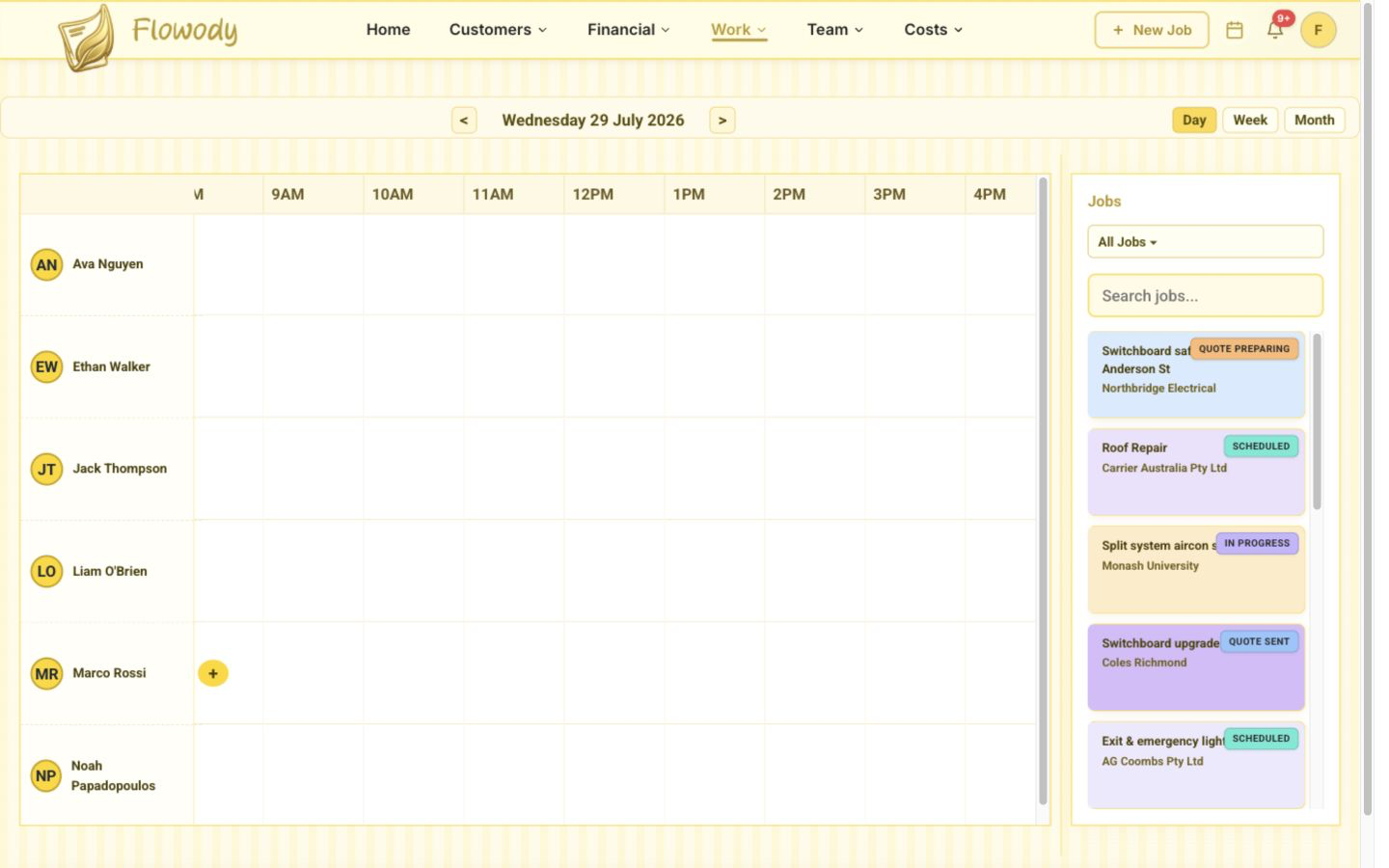
Watch for the difference between assigning someone to a job and actually booking their time. In Flowody you can assign several electricians to one job and create separate time blocks for each across multiple days — how a three-day rewire with a changing crew is meant to be scheduled. When a call-out lands at 10am, moving an afternoon job takes a second, and notifications go out by push, email, SMS or WhatsApp instead of a phone call. There's a step-by-step scheduling guide if you want to see it in practice.
From quote to accepted job to invoice — without retyping
The quote is where the job starts, and where most double handling begins. If the quote lives in a Word document, the accepted work is re-entered as a job, and the details are typed again into an invoice, you're doing the same admin three times and creating two chances to get the numbers wrong.
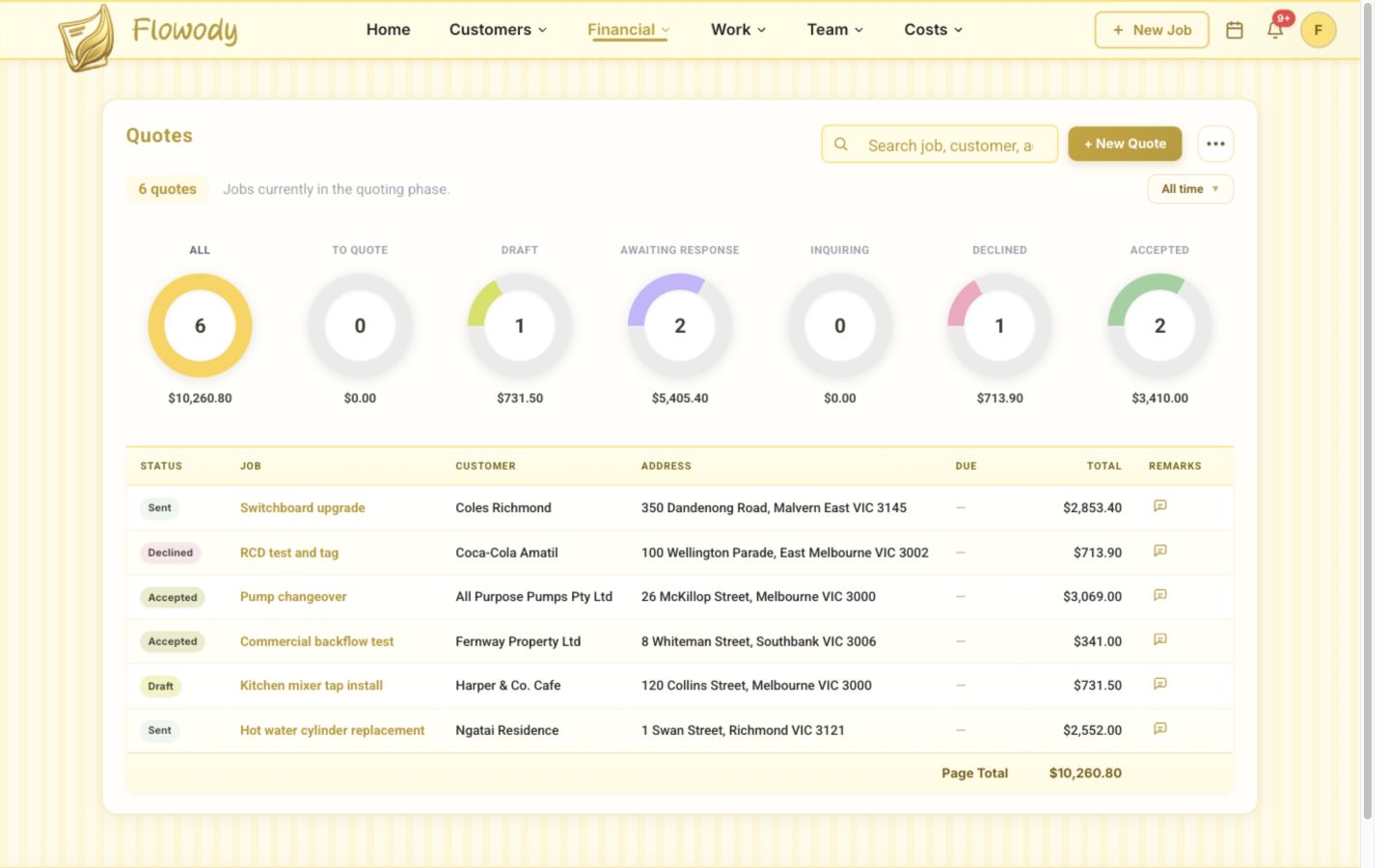
A connected flow works differently. You build a branded quote from saved line items and rates, the customer accepts it from a public link, and because the accepted quote is already tied to its job, the customer, site and quoted work carry through to scheduling and then the invoice. Flowody also supports combined invoices, useful when you've done six small call-outs for the same builder and want to bill them once. The other half is follow-up: most quotes aren't rejected, they're forgotten. Our guide on how to quote a trade job covers scoping and pricing.
Electrical job costing: tracking labour and materials
Electrical job costing is the difference between being busy and being profitable. Two jobs can quote at the same number and finish hundreds of dollars apart once you count the extra return visit, the cable bought at retail price, and the apprentice hours nobody estimated. Costing works when three things are captured as work happens, not reconstructed afterwards:
- Labour — hours worked by each person, captured from check-in and check-out rather than remembered at the end of the week.
- Materials — cable, switchgear, accessories and consumables recorded against the job, including items picked up mid-job that never reach a paper docket.
- The quoted value — so actual cost sits beside what you sold the job for, and you see the margin before the invoice goes out.
Flowody tracks materials and labour against the quoted value as work progresses, with cost reports and a financial summary across jobs. Costing one job tells you what happened; costing across jobs tells you which work is worth taking. Plenty of electrical businesses find their small maintenance call-outs carry a better margin than the large installs they've been chasing.
Digital safety forms, checklists and customer signatures
Electrical work carries more compliance paperwork than most trades, and paper is the worst medium for it — a form is only useful if it can be found later, during a dispute, an audit or a warranty claim. Look for a form builder rather than fixed templates, because no two electrical businesses run identical paperwork.
Flowody uses a drag-and-drop form builder, so you can create SWMS, risk assessments, hazard and incident reports, PPE checklists, safety inductions and your own job sheets, attach them to any job, and complete them on a phone or tablet on site. Sign-off is captured as a signature on the device, or sent as a secure signing link when the person signing isn't there. One clarification: storing certificates isn't the same as generating them. Each job has folders for certificates and reports, so compliance documents are organised and searchable by customer and site — Flowody stores those documents rather than producing certificates of electrical safety. There's more on this in digital job sheets versus paper.
GPS job check-in and check-out with distance-to-site verification
GPS means different things on different platforms, so it's worth being precise. Flowody's GPS feature is job check-in and check-out: the electrician checks in from the mobile app on arrival and checks out when they leave, and each check-in records distance-to-site data so attendance against the job address can be verified. It is not live tracking, and there's no map following the crew between jobs.
In practice that's usually what an electrical business needs: a defensible record of who attended which site and when — useful when a builder queries an attendance charge — and the hours that feed job costing, without anyone filling in a timesheet or being tracked between jobs.
Stripe payments, receipts and accounting integration
Every day between finishing the work and getting paid is a day of your cash funding someone else's project. Two things shorten it: invoicing immediately, and making payment frictionless. Flowody processes payments through Stripe, so a card link on the invoice lets the customer pay in seconds instead of digging out bank details, and a branded payment receipt is sent automatically the moment they pay.
Electrical contractor software shouldn't try to be your accounting package; it should hand clean data to the one you already use. Flowody has two-way Xero and QuickBooks integration, so invoices and payments flow through instead of being re-keyed, and Google Calendar and Outlook are supported too. When comparing platforms, check the direction of the sync — a one-way export that never brings payment status back still leaves someone reconciling by hand.
How office admins and field electricians work together
Most electrical businesses have two kinds of user. The office needs the full view — quoting, scheduling, invoicing, customers, costs and reports. The electricians need a short list: what's on today, where it is, which forms to complete, and somewhere to put photos and notes. Flowody splits seats along those lines, with admin seats for the office and field user seats for the crew, plus a mobile app for iOS and Android. The office sees the job update the moment a form is submitted or the crew checks out, so the invoice can go out without ringing to ask whether the job is finished.
This is also where per-user pricing quietly becomes expensive, so check it before you commit. Flowody starts at $30 AUD per month including one admin seat, with extra admin and field user seats added individually and every feature included on every plan rather than locked behind a tier. The pricing page has a seat calculator for your crew size.
A checklist for choosing job management software for electricians
Every platform demos well. Run any shortlisted option against the things that actually bite an electrical business:
- Can it handle one customer with many sites, and separate contacts for booking, sign-off and billing?
- Can you assign several electricians to one job and book separate time blocks across multiple days?
- Does an accepted quote become a job, then an invoice, without re-entering the customer, site or line items?
- Can you combine several small jobs onto one invoice for a repeat commercial customer?
- Are materials and labour tracked against the quoted value while the job is running?
- Can you build your own forms — SWMS, risk assessments, PPE checklists, job sheets — or are you stuck with fixed templates?
- Can the customer sign on site, and can you send a signing link when they're not there?
- Can you upload and organise certificates and reports against each job, and find them later by customer or site?
- Will the crew actually use the mobile app, including where reception is poor?
- Does it sync two-way with the accounting package you already use?
- Is every feature on every plan, and what's the bill once you add two apprentices and another admin?
Then do the test that beats any feature list: run one real job through the free trial end to end — quote it, schedule it, complete the safety form on site, check in and out, cost the materials, invoice it, take the payment. A platform that feels fast for one job will feel fast for two hundred.
Want to see it in action? Flowody is free for 30 days — all features included, no lock-in.
Start Free Trial →Start with the job you're quoting this week
You don't need to move everything at once. Pick the part costing you the most — usually quoting, or getting paperwork back from site — and fix that first. The rest follows, because once the job record exists in one place, scheduling, costing and invoicing all have something to hang off.
Flowody is job management software for electricians built in Australia, covering scheduling, quoting, invoicing, Stripe payments and automatic receipts, digital forms and signatures, job costing, GPS job check-in with distance-to-site verification, and two-way Xero and QuickBooks integration, with a mobile app for the field. See the electrician overview, the full feature list, or start a 30-day free trial.
Frequently asked questions
What is job management software for electricians?
It's software that runs an electrical job end to end in one place — the customer and site record, the quote, the schedule, the on-site forms and photos, the labour and material costs, the invoice and the payment. Instead of details living in text messages, paper job sheets and spreadsheets, everything stays attached to the job, so the office and the field work from the same information.
Does Flowody track my electricians' location in real time?
No. Flowody does not provide live GPS tracking or a live map of your crew. It provides job check-in and check-out from the mobile app, with distance-to-site data recorded so you can verify attendance at the job address. That gives you a record of who attended which site and when, and the hours that feed into job costing, without continuously tracking anyone's movements.
Can I create electrical safety forms and job sheets?
Yes. Flowody's drag-and-drop form builder lets you build your own forms — SWMS, risk assessments, hazard and incident reports, PPE checklists, safety inductions and custom job sheets — attach them to any job, complete them on site from a phone or tablet, and capture a signature on the device or through a secure signing link. Completed forms stay attached to the job record.
Can I store electrical certificates and reports against a job?
Yes. Each job has dedicated folders for certificates and reports, so you can upload compliance documents and find them later, organised by customer and site. Flowody stores and organises those documents rather than generating certificates for you.
How much does job management software cost for an electrical business?
Pricing varies widely, and per-user plans with feature tiers are where costs tend to escalate as a crew grows. Flowody starts at $30 AUD per month including one admin seat, with extra admin and field user seats added as needed and every feature included on every plan. There's a 30-day free trial with no lock-in, so you can run a real job through it before committing.